
Download Postin – AI LinkedIn Post Writer for Professionals
Overview
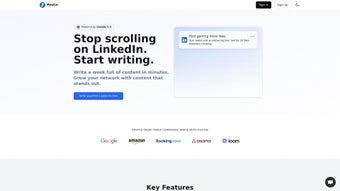
Postin is a cutting‑edge AI writing assistant built specifically for the LinkedIn ecosystem. In a world where professional visibility can make or break careers, having a reliable tool that turns ideas into viral‑ready posts is a game‑changer. Postin’s web‑based platform removes the guesswork from content creation by analyzing real‑time trends, industry‑specific keywords, and engagement patterns to suggest post ideas that resonate with a business‑focused audience.
Whether you’re a solo entrepreneur looking to amplify your personal brand, a marketer tasked with boosting engagement metrics, or a corporate team aiming to showcase services and thought leadership, Postin streamlines the entire workflow—from brainstorming to publishing—without requiring any coding or design expertise. The interface is clean and intuitive: users type a brief prompt, select a tone or style, and the AI instantly generates a polished LinkedIn post ready for customization. The tool also supports brand alignment, allowing you to embed your company’s voice, hashtags, and calls‑to‑action with a single click.
With a full‑version license that scales from individuals to teams, Postin offers a secure, subscription‑based solution that receives regular updates to keep pace with LinkedIn’s algorithm changes. In short, Postin empowers professionals to create engaging, relevant, and shareable LinkedIn content quickly, consistently, and confidently.
Key Features That Set Postin Apart
- AI‑Driven Trend Analysis: Real‑time scanning of LinkedIn’s most popular topics ensures your posts tap into current conversations.
- Customizable Voice & Tone: Choose from professional, conversational, thought‑leader, or casual tones to match personal or corporate branding.
- One‑Click Hashtag Generator: Automatically suggests high‑impact hashtags based on content relevance and audience reach.
- Brand Consistency Tools: Save brand guidelines, preferred phrasing, and signature sign‑offs for instant insertion.
- Post Length Optimization: The AI recommends optimal character counts to maximize LinkedIn’s algorithmic favor.
- Collaboration Workspace: Teams can share drafts, comment, and approve posts before they go live.
- Performance Insights: Integrated analytics show predicted engagement rates and best posting times.
- Secure Cloud Storage: All drafts are saved securely with end‑to‑end encryption, complying with GDPR and CCPA standards.
- Regular Updates & Support: Monthly feature releases keep the tool aligned with LinkedIn’s evolving platform.
- Multi‑Language Support: Create posts in English, Spanish, French, German, and more, expanding global reach.
Each feature has been engineered with the professional user in mind. The trend analysis engine pulls data from LinkedIn’s public API, content clusters, and competitor activity, delivering suggestions that are both timely and niche‑specific. The brand consistency module eliminates the risk of off‑message communication, a common pitfall for large teams juggling multiple campaigns.
Moreover, the collaboration workspace mimics familiar project‑management tools, allowing marketers to maintain editorial control without the friction of endless email threads. By bundling analytics directly into the drafting phase, Postin not only helps you write better posts but also educates you on what works, fostering continuous improvement. Whether you are a solo consultant aiming to post daily insights or a marketing department scheduling a weekly thought‑leadership series, these features collectively accelerate the content creation pipeline while safeguarding quality and relevance.
Installation, Usage & Compatibility
Getting started with Postin is straightforward and requires no heavy software installation. As a web‑application, it runs in any modern browser, making it accessible from Windows, macOS, Linux, as well as mobile platforms such as Android and iOS. Follow these simple steps to begin generating LinkedIn posts:
- Visit the Official Site: Navigate to postin.ai and click “Start Free Trial” or “Buy License” to create your account.
- Account Verification: Verify your email address using the link sent to your inbox. This step secures your workspace and enables cloud storage.
- Choose a Plan: Select the individual or team license that fits your needs. All plans include automatic updates and priority support.
- Set Up Brand Guidelines (Optional): Upload your company’s style guide, preferred hashtags, and signature blocks. The system will remember these for future drafts.
- Start a New Post: Click “Create Post,” type a brief prompt or keyword, and let the AI generate three variations within seconds.
- Customize & Optimize: Edit the generated text, adjust the tone, add media links, and use the built‑in hashtag tool.
- Preview & Schedule: Use the preview mode to see how the post will appear on LinkedIn, then either publish instantly or schedule for optimal timing.
- Track Performance: After publishing, monitor predicted engagement metrics and refine future prompts based on real outcomes.
Supported Operating Systems: Postin works seamlessly on Windows 10/11, macOS Ventura and later, Chrome OS, as well as mobile browsers on Android 9+ and iOS 13+. Because it is cloud‑based, there is no need for local installations, ensuring that updates are applied instantly without user intervention.
The user interface is responsive, automatically adjusting to desktop, tablet, or smartphone screen sizes. Security is a top priority; all data transmission is encrypted via HTTPS, and stored drafts are protected with AES‑256 encryption. For teams, an admin dashboard allows permission management, usage reporting, and single‑sign‑on (SSO) integration with Azure AD or Google Workspace. This combination of ease‑of‑use, cross‑platform compatibility, and robust security makes Postin a practical choice for any professional looking to enhance their LinkedIn presence without technical hurdles.
Pros and Cons
- Pros:
- AI generates high‑quality, trend‑aligned content in seconds.
- Fully customizable tone and brand guidelines.
- Collaborative workspace streamlines team approvals.
- Cross‑platform access—no installations required.
- Secure cloud storage with GDPR compliance.
- Integrated analytics provide actionable insights.
- Cons:
- Dependent on internet connectivity for real‑time generation.
- Learning curve for mastering advanced prompt techniques.
- Subscription cost may be a barrier for very small freelancers.
Frequently Asked Questions
Is Postin only for LinkedIn?
Yes, Postin is specialized for LinkedIn. Its AI is trained on LinkedIn’s content patterns, engagement metrics, and professional tone, making it uniquely effective for this platform.
Can I use Postin on my mobile device?
Absolutely. Postin is a responsive web app, so you can create, edit, and schedule posts from any modern browser on Android or iOS devices.
How does the AI stay up‑to‑date with LinkedIn trends?
Postin continuously pulls data from LinkedIn’s public API, trending hashtags, and industry news feeds. This feed is refreshed hourly, ensuring the suggestions reflect the latest conversation topics.
Is there a free version or trial?
Yes, Postin offers a 7‑day free trial with full feature access. No credit card is required to start the trial.
What support options are available?
Subscribers receive 24/7 email support, live chat during business hours, and a comprehensive knowledge base. Premium plans include dedicated account managers.
Conclusion & Call to Action
In a professional world where every post can influence perception, Postin delivers a reliable, AI‑powered shortcut to high‑impact LinkedIn content. Its blend of trend‑aware generation, brand‑centric customization, and collaborative tools eliminates the guesswork and time‑sink that traditionally accompany social media strategy. While it requires an internet connection and a modest subscription, the ROI—measured in increased engagement, follower growth, and brand authority—quickly outweighs the cost for most users. If you’re serious about strengthening your LinkedIn presence, boosting visibility for your business, or simply saving hours each week on content creation, Postin is the tool to adopt today.
Ready to transform your LinkedIn feed? Download Postin now, start your free trial, and experience the future of professional social media writing.



.png)



